We are using Oracle Key Vault and backup has been configured using OKV Console . It was running fine for couple of days, Once the destination was full then backup got stuck and now even after clearing the space, backup is not running and it’s stuck. We are not able to create another backup job, because it throws error that backup is ONGOING and can not be scheduled another backup.
Example: In GUI DR-OKV it still show restore status is ONGOING “basically it got stuck with this” so we can’t unable to perform anything on it like backup or restore it again it says Restore is in progress.
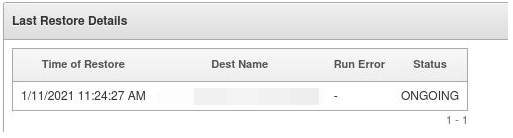
This could happens while you are upgrading OKV Appliance or During regular OKV restoration. [/bin/mv: writing `/usr/local/dbfw/tmp/tmp.zkPrLEJEXj’: No space left on device]
- Please remove the temporary ‘jar’ files located in the’
/usr/local/okv/ssl'. Note not to delete any files other than the jar files, otherwise, the Oracle Key Vault server becomes non-functional. - Ensure that the server meets the minimum disk space requirement restore. If the directory ‘/usr/local/dbfw/tmp’ does not have sufficient free space, then delete any diagnostics ‘.zip’ files
- If your Oracle Support asked you to do “Fresh Install” then Please don’t do it. Please spend some time your exact error.
- As SYS user on OKV Database, ran below procedure.

- Now the status is changed to DONE.
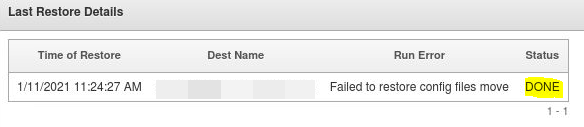
- We did our research and figured out few backend scripts and code, where this command is found

 DBADEEDS
Leave a comment